
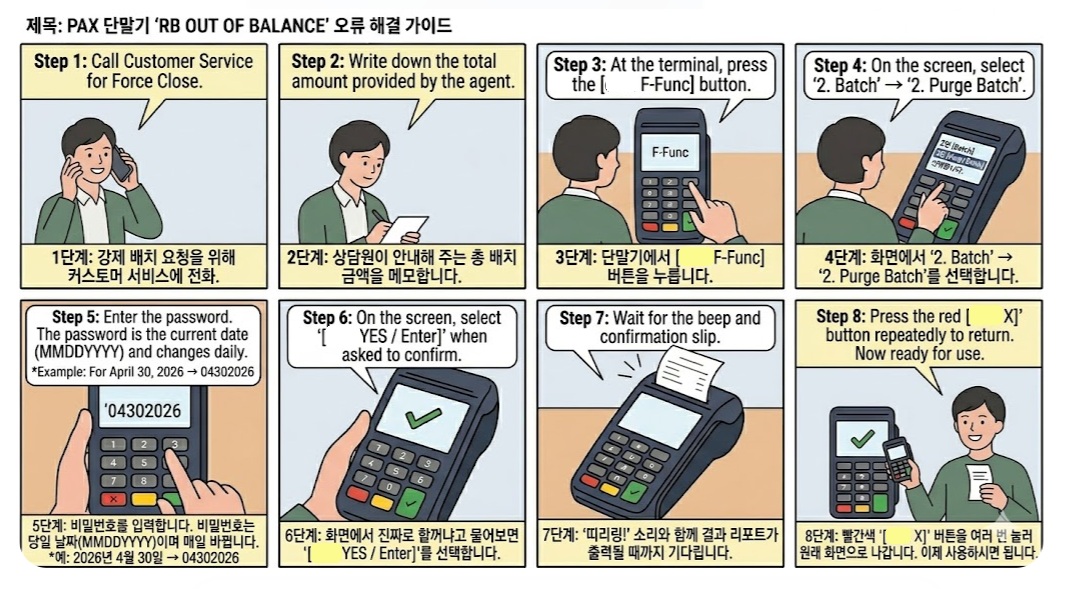
PAX 단말기 [RB OUT OF BALANCE] 해결 매뉴얼
배치 클로즈를 시도했을 때 리포트 대신 “Response: RB OUT OF BALANCE”라는 문구가 나온다면 아래 순서대로 조치해 주세요.
1-833-282-3925로 전화하여 “Force Close Batch”를 요청하십시오. 직원이 은행 호스트 쪽에서 배치를 시키고 정산 금액을 알려줄 것입니다.
카드 기계에서 [F-Func] 버튼을 누른 후, 화면에서 2번 [Batch]를 선택합니다.
2번 [Purge Batch]를 누릅니다. 비밀번호를 물어보면 당일 날짜 8자리를 입력하십시오.
입력 후 엔터를 누르고, 진짜 할꺼냐고 물으면 [YES-엔터] 버튼을 누릅니다.
기계에서 “띠리링!” 소리와 함께 작은 리포트가 나옵니다. 빨간색 [X] 버튼을 여러 번 눌러 메인 화면으로 나간 뒤 사용하시면 됩니다.
PAX Terminal [RB OUT OF BALANCE] Guide
If your batch close fails with the message “Response: RB OUT OF BALANCE”, please follow these steps:
Call 1-833-282-3925 and request a “Force Close Batch”. The agent will process the batch on the host side and provide the total amount.
Press the [F-Func] button on the terminal, then select Option 2 [Batch].
Select Option 2 [Purge Batch]. When prompted for a password, enter the current date in 8 digits (MMDDYYYY).
Press Enter, and when asked to confirm, press the [YES-Enter] button.
The terminal will beep and print a small report. Press the Red [X] button repeatedly to return to the main screen. You are now ready to use the terminal.